

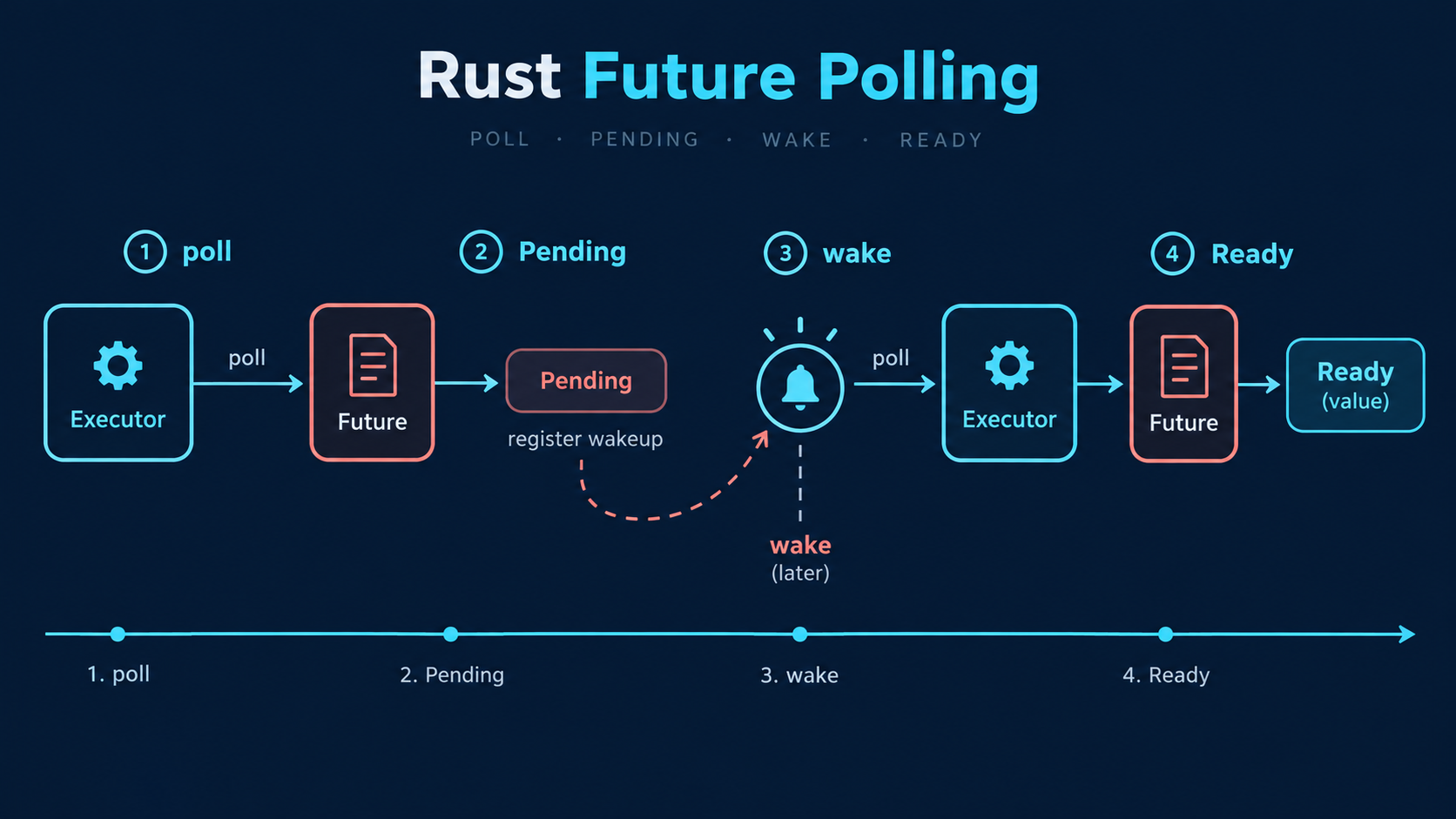
Understand it
Calling an async fn does nothing on its own: it builds a state machine that makes progress only when polled. .await yields at that point, letting the executor run something else while the operation is pending — which is how one thread can service thousands of waits.
Calling an async fn creates a future that represents work to be performed. It does not run the body to completion immediately. An executor polls the future; it may return Poll::Pending, register a way to be woken, and yield the thread to other tasks. When the awaited operation can make progress, the waker schedules another poll. Eventually the future returns Poll::Ready(value). This is why many I/O waits can share a small number of threads.
An .await marks a point where the task may suspend. Local values that are needed afterward become part of the future's state, which affects memory usage and whether the future can be safely sent between executor threads. Code between await points still runs synchronously until it yields or completes, so a long CPU loop can monopolize an executor worker even though it sits inside an async function.
Write a short async function that logs before and after an awaited timer. Observe that constructing its future does not print the whole sequence; running it on an executor does. Then launch two timer futures concurrently and compare the elapsed time with running them one after the other. Avoid thinking of each future as a thread. A future is a state machine plus a polling contract; the runtime decides when and where to poll it. That distinction helps you choose between async waiting, blocking work, and true parallel computation.
A future normally needs to be polled by an executor to make progress. Merely storing it in a variable does not schedule it. That is a common source of confusion when an async call appears to do nothing. Trace where the future is awaited, spawned, or otherwise polled.
Read the code
async fn fetch(id: u32) -> String {
    format!("record {id}")
}

async fn run() {
    let pending = fetch(7); // nothing ran yet
    let value = pending.await; // now it runs
    println!("{value}");
}
Nothing happens until the future is awaited or spawned.
Practice starter
async fn work() { println!("working"); }

fn main() {
    work();
}Try it
Explain what a call to an async fn actually produces.
What success looks like: You can say why the body has not executed at that point.
Check your understanding
What does that print with no await?
Reveal the answer
- working, printed as soon as the future is built
- Nothing — the future is never awaited
- It panics because nothing ever polls it
The future is created and dropped without ever being polled.
Go deeper
Common misconception: “Calling an async fn runs its body, at least up to the first .await.”
Futures are lazy: no poll, no progress. The call only builds the future, so even a println! at the top of the body waits for the first poll.
- Build the future:
fetch(7)returns a future and stores it inpending. The body offetchhas not run, so noformat!has happened. - Await it:
pending.awaitpolls the future.fetchhas nothing to wait for, so it finishes on that poll and producesrecord 7. - Find the driver:
runis itself a future, so nothing in the example starts until an executor pollsrun(). Only then doesprintln!show the line.
Transfer challenge: Add let skipped = fetch(8); to run and put a println! inside fetch. Predict how many times that line appears once run is driven by an executor, then check with one.
Connections
- Send & Sync: The traits behind thread safety
- Runtimes: Why async needs an executor
Learn this lesson with AI
Paste this into Claude, Codex, Cursor or another agent connected to Crabrix Academy. It contains only this lesson’s public details.
I'm learning Rust with Crabrix Academy. Teach me this lesson with the Crabrix Academy tools.
Lesson: Futures (courseId "concurrency", lessonId "futures")
Link: https://crabrix.com/learn/concurrency/futures/
Goal: Futures are lazy: no poll, no progress.
Practice: open the starter in the Crabrix Playground (https://crabrix.com/playground/?lesson=concurrency/futures) and I will write the code there.
Explain it step by step for my level, let me write the code myself, give hints before any solution, and do not mark anything as passed: only Crabrix checks do that.