

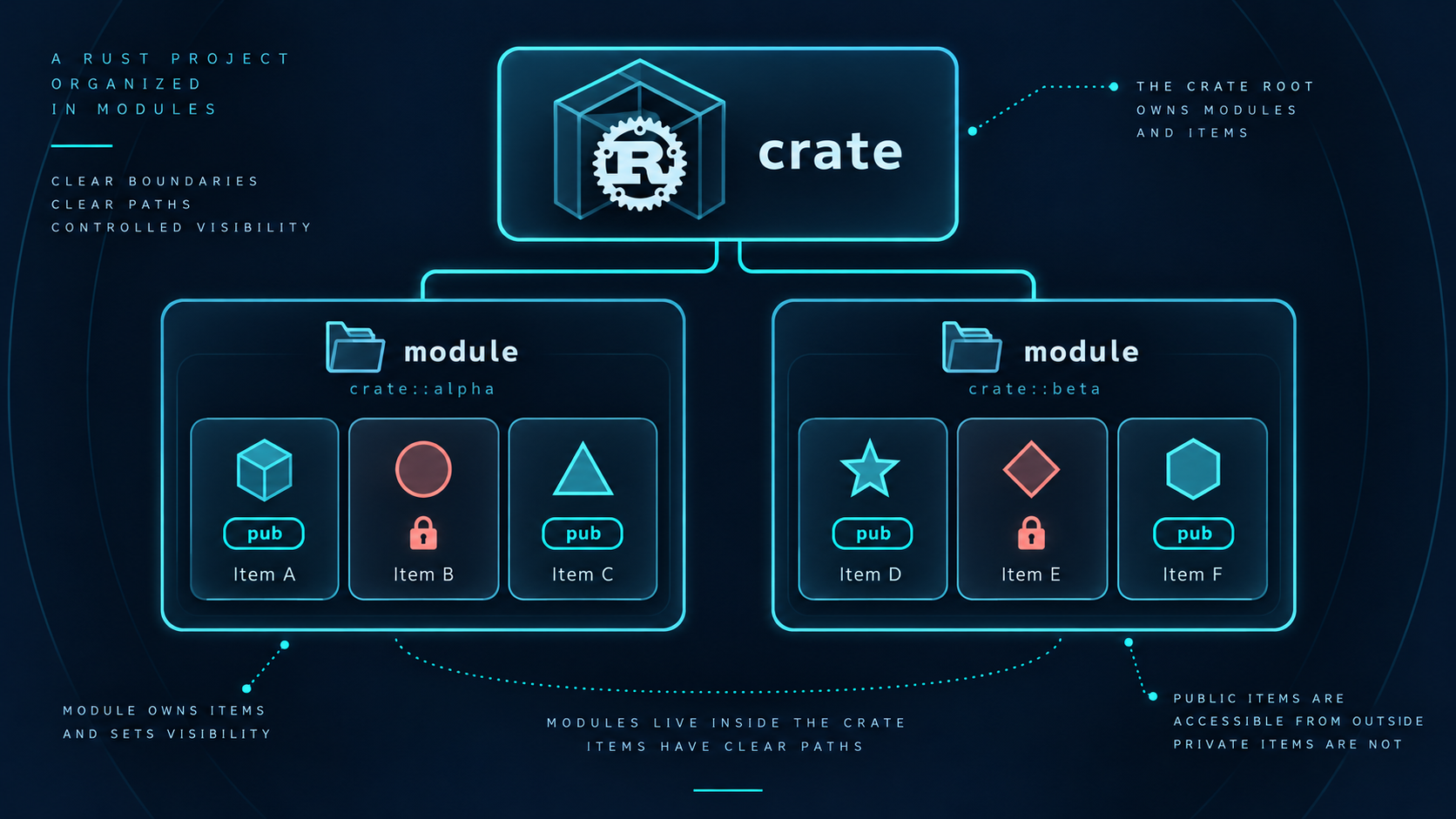
Understand it
mod declares a module and use brings a path into scope, while pub decides what actually escapes. Cargo.toml describes the package around them — the same file the package manager reads to resolve your dependencies.
A module gives names and boundaries to related code. In the example, mod greeter; tells Rust to compile the module from src/greeter.rs; greeter::message() follows a path to an item inside it. The use keyword can shorten a path in the current scope, but it does not change whether an item is visible. Visibility starts private. pub opens an item to callers permitted by the module hierarchy, and a public function exposed from a library crate becomes part of the interface other crates may rely on.
Start a tiny project with src/main.rs and src/greeter.rs. First call the function by its full path. Then import it with use and compare the call site. Remove pub and read the compiler diagnostic. This sequence separates three ideas that are easy to blur: file layout determines where code is found, module paths determine how it is named, and visibility determines who may call it. A file is a convenient module boundary, not a permission switch by itself.
As a project grows, prefer modules named for responsibilities rather than for arbitrary technical layers. Keep small helpers private and expose the minimum stable API. If callers need to write a long, surprising path, consider a deliberate pub use re-export at the crate root. That keeps internal files free to move without forcing every caller to change. Cargo.toml describes the package and dependencies; it is related to the project but does not replace Rust's module tree.
Read the code
// src/main.rs
mod greeter;

fn main() {
    println!("{}", greeter::message());
}

// src/greeter.rs
pub fn message() -> &'static str {
    "hello from a module"
}
mod declares it; pub decides what leaves it.
Practice starter
mod util {
    fn helper() -> u32 { 1 }
}
let value = util::helper();
Try it
Open the multi-file project, trace mod greeter, and change its public function.
What success looks like: It compiles from src/main.rs and prints the edited output.
Check your understanding
Why can't main call helper?
Reveal the answer
- It lives in a different file from main
- Items are private by default, so it needs pub
- A module function has to return a Result
Privacy is the default; pub fn helper makes it reachable.
Go deeper
Common misconception: “A function inside a mod is visible to the rest of the crate by default.”
Items are private by default; pub is what exposes them. helper stays private to util until it is marked pub.
- Find the file:
mod greeter;insrc/main.rstells Rust to compilesrc/greeter.rsas thegreetermodule. - Follow the path:
greeter::message()names the function through its module, andpubonmessageis what letsmainreach it. - Remove pub: Delete
puband the call fails with E0603: the file layout found the code, but visibility still refuses the caller.
Transfer challenge: Move message into a new src/text.rs and keep the greeter::message() call working with a pub use. Predict which mod, use, and pub lines must change.
Connections
- Testing: Unit and integration tests
Learn this lesson with AI
Paste this into Claude, Codex, Cursor or another agent connected to Crabrix Academy. It contains only this lesson’s public details.
I'm learning Rust with Crabrix Academy. Teach me this lesson with the Crabrix Academy tools.
Lesson: Modules (courseId "projects", lessonId "modules")
Link: https://crabrix.com/learn/projects/modules/
Goal: Items are private by default; pub is what exposes them.
Practice: give me the lesson's exercise (crabrix_academy_get_exercise); I will write and run the code in Crabrix.
Explain it step by step for my level, let me write the code myself, give hints before any solution, and do not mark anything as passed: only Crabrix checks do that.