Crabrix blog
Cargo features: smaller builds and portable dependencies
Understand Cargo feature unification, defaults and target limits. Design additive features, inspect dependency requests, and test portable configurations.
· 11 min read
Crabrix blog
Understand Cargo feature unification, defaults and target limits. Design additive features, inspect dependency requests, and test portable configurations.
· 11 min read
Adding a Rust dependency is easy to describe as one line in a manifest. The build that follows depends on more than the crate’s name: the resolved package version, activated features, compilation target, build scripts and host-side tooling all contribute. A package that works in a desktop command-line application may not fit an on-device WASI environment with the same manifest entry. Understanding features helps you ask the right questions before assuming a dependency is portable.
Features are named compile-time capabilities selected through Cargo. They can enable optional dependencies or conditional Rust code. They are useful for separating a small core from optional functionality, but they are not a sandbox, a compatibility certificate or a runtime settings system. Disabling a feature can remove a dependency path only when the package has actually designed that path to be optional.
We will build a tiny local package with one feature, explain why feature requests can combine, and develop a review process for constrained targets. The manifest and desktop Cargo commands are complete enough to reproduce locally. They do not imply that Crabrix’s bundled terminal implements every desktop Cargo command or can build arbitrary host tools.

Create a local desktop Cargo binary package named feature_lab. Its report always exists, while a pretty-report feature changes its presentation. There are no external dependencies. This intentionally small design lets you see conditional compilation without confusing it with registry resolution, native libraries or network access. Start with a local package whose complete source is visible, then transfer the same reasoning to a larger dependency tree.
The manifest below declares an empty default set and an independently selectable capability. The feature has an empty dependency list because it gates only code in this package. An actual library might connect a feature to an optional dependency, but adding a third-party package is not required for a feature to be meaningful. The package name, edition and version describe this illustrative local project; they are not a recommendation for a particular registry release.
Features should have names that tell a caller what becomes available. Names such as disable-everything or not-mobile are hard to combine because their meaning depends on what other requests are active. Positive capability names make an additive design easier to explain and test.
# Cargo.toml for a new local desktop package
[package]
name = "feature_lab"
version = "0.1.0"
edition = "2024"

[features]
default = []
pretty-report = []Place the following program in src/main.rs of that local package. Exactly one report implementation is compiled for a given feature selection. The cfg attributes remove the other implementation before type checking the selected program. This differs from an ordinary runtime if, where both branches must still be valid Rust code for the build. Use conditional compilation when the source itself depends on a compile-time capability.
The two implementations preserve the same basic contract: they report a count. The pretty version adds formatting rather than changing what the number means. That is a useful pattern for additive features. If enabling an unrelated capability changes a parser from strict validation to silently dropping records, callers can no longer reason about feature combinations safely. A feature should not casually rewrite the semantics of the core API.
The example uses only standard-library formatting and is not a size benchmark. Even a feature that removes source code does not justify a fixed binary-size reduction claim without measurement. Treat conditional compilation as a mechanism you can inspect, then measure the actual build artifact if size is part of your product requirement.
#[cfg(feature = "pretty-report")]
fn report(count: usize) -> String { format!("[ readings: {count} ]") }

#[cfg(not(feature = "pretty-report"))]
fn report(count: usize) -> String { format!("readings={count}") }

fn main() {
    let output = report(3);
    #[cfg(feature = "pretty-report")]
    assert_eq!(output, "[ readings: 3 ]");
    #[cfg(not(feature = "pretty-report"))]
    assert_eq!(output, "readings=3");
    println!("{output}");
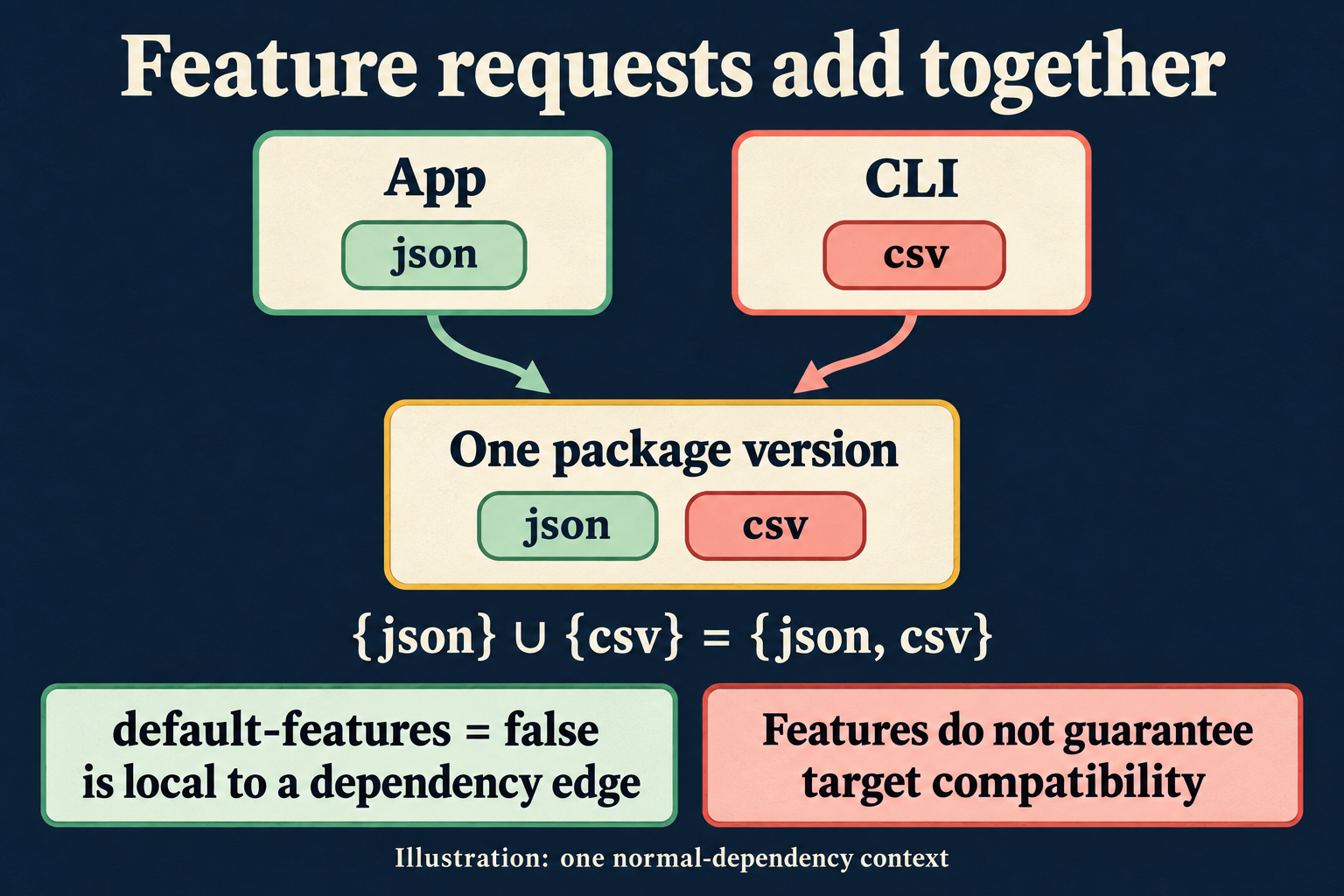
}A package can put a convenient collection of capabilities in its default feature. A dependency declaration normally activates those defaults unless that declaration opts out with default-features = false. This option affects the request made through that dependency edge. It does not guarantee that the package’s defaults are absent from the entire resolved build. Another dependency can request them too.
That distinction explains a frustrating debugging session: you disable defaults in your own manifest, but an unwanted capability still appears. The next step is to inspect who else depends on the same package and which features they request. Repeating the same local option or deleting the lockfile does not answer that question. The build graph, rather than one isolated manifest entry, determines the activated capability set within the relevant resolution context.
For a library author, changing the default set can affect downstream users even if all feature names remain available. Document defaults as part of the public experience. For a consumer, keep explicit feature selections near the dependency declaration so a reviewer can see why the package is needed and which capabilities your code actually relies on.
Consider an application path requesting a hypothetical package’s json feature and a command-line path requesting its csv feature. If those requests refer to one resolved package version in the same normal-dependency context, Cargo combines them. The package is built with both capabilities. One caller does not get to subtract a capability another caller requires. This is why feature design generally needs to be additive.
The infographic shows that specific context. It is not a claim that every package name has one globally unified feature set in every build. Different package versions are distinct, and modern resolver rules can separate requests across contexts such as build dependencies, development dependencies and inactive targets. Those boundaries matter when investigating why a package is built more than once or why a host-side feature is absent from the target build.
When debugging, write down the package version and the context before discussing “the features.” Otherwise two people may be describing different compilation units using the same crate name. A precise graph inspection is more reliable than concluding that Cargo ignored a manifest because a capability appeared unexpectedly.
Sources: Cargo reference: features · Cargo reference: dependency resolution
Desktop Cargo’s tree output can show which packages depend on a package and how features are activated. Start with the actual resolved project, rather than a copied manifest fragment from a tutorial. A lockfile records resolved versions for reproducibility, while the manifest declares acceptable requirements and feature requests. They serve related but different purposes. Neither alone is a complete explanation of the compilation target or every enabled capability.
The commands below are for the local desktop package. A larger project can use feature-oriented tree output and an inverse dependency view to identify the source of a request. When inspecting a specific package with multiple resolved versions, disambiguate the package selection. Avoid removing a transitive dependency by name without understanding which capability introduced it and whether your code still needs that capability.
Keep notes about the request path when making a portability change. “Disabled default features because the core parser does not need the optional integration” is reviewable. “Cargo was broken, so several dependencies were removed” is not. A small explanation saves the next developer from accidentally restoring the same unsupported path.
# Desktop commands, inside feature_lab
cargo run --no-default-features
cargo run --no-default-features --features pretty-report
cargo tree -e featuresA dependency can expose pure Rust source and still require facilities unavailable in a particular environment. It may rely on operating-system APIs, native linking, a build script that invokes external tools, or a procedural macro that executes on the build host. Feature flags can help when those requirements are optional, but a flag cannot create a missing host library or operating-system service by itself.
For Crabrix, treat the bundled on-device Rust and WASI toolchain as a specific environment with documented limits. Do not infer support for a package merely because a desktop target builds it. In particular, procedural macro support and arbitrary build-script execution are not capabilities you should assume. A parser-only feature path may be useful if the package genuinely separates parsing from host-only generation, but that separation must be verified in the package’s source and manifest.
A useful compatibility note names the tested package version, selected features, target and operation. “Parsing this input works under this configuration” is a bounded statement. “This crate supports mobile” is too vague to help someone understand which parts were exercised or what will happen when they enable another integration.
A feature determines what code is compiled into an artifact. A user preference determines what an already built application does at runtime. If a person should be able to switch a report’s color theme without installing a new build, that choice belongs in runtime configuration. Using a compile-time feature for a runtime preference creates unnecessary build variants and makes testing harder.
There are reasonable combinations: a feature can include an optional export format, while a runtime setting chooses whether to use that format for a particular operation. Keep those layers separate in names and documentation. The presence of a capability does not force the user to activate it for every request, and a runtime toggle cannot activate source that was excluded from the binary.
Also avoid treating features as an authorization system. Code compiled into an application is not a substitute for checking whether a request is permitted. Features organize artifacts; permissions govern actions. Confusing them leads to fragile product logic and misleading claims about what a build-time option protects.
For the local example, run both the empty feature set and pretty-report; the assertions check the intended output in each build. In a real library, test the smallest supported core, each important optional capability, and combinations that share code or dependencies. If two features are documented to work together, a successful separate run of each one does not prove their combination works.
An --all-features build is useful only when enabling everything together is a supported configuration. Some ecosystems contain intentionally exclusive backend selections. Blindly using one enormous configuration can miss the absence of a default capability and can also request combinations the package never promised. A small explicit matrix based on supported use cases is more informative than one universal command copied into every project.
Include target-specific checks where they matter. Compiling on the host validates the host build, not a different target. A successful compile also does not establish that file access, time, networking or other environmental behavior works as expected at runtime. Exercise a representative operation in the environment your users actually have.
If reducing an artifact is the goal, compare builds made with the same toolchain, target, profile and relevant build settings. Change one feature selection at a time, record the exact configuration and measure the resulting artifact. A development binary and an optimized release binary are not a fair feature comparison. Debug information and link settings can outweigh the capability you intended to study.
Look at the result users download or install, not only an intermediate object file. Packaging and compression can affect the delivered size. If the change also affects startup or memory, measure those separately under a repeatable workload. A smaller executable does not automatically mean every operation runs faster. Avoid claiming percentages based on one attractive pair of numbers without recording how the pair was produced.
This article intentionally provides no invented savings figure. The repeatable benefit of a well-designed core is that its requirements can be inspected and tested independently. Any size or performance improvement is a result to establish for your actual build, not a property granted by the word “optional” in a manifest.
A short support note can prevent a working configuration from becoming tribal knowledge. Record which operation you verified, the feature selection used for it, and the environment where it ran. If a desktop-only export backend is intentionally outside the portable core, say so near the relevant manifest entry or public documentation. A future maintainer should not have to rediscover the boundary by repeatedly triggering a missing-library error.
For the local package in this guide, the note is simple: the default and pretty-report configurations use only the standard library and produce the two asserted strings in a desktop Cargo run. It does not claim a measured size improvement, registry compatibility or additional on-device terminal commands. For a real dependency, keep the same specificity and update the note when the resolved version or selected capabilities change. A reproducible support claim is more useful than a broad badge whose meaning nobody can explain.
Before adding a dependency to a constrained project, identify the smallest API you need. Inspect its documented features and defaults, select the required capabilities explicitly where appropriate, and inspect the resulting request graph. Then verify host-tool requirements and target-specific code. Finally, compile and run a representative case in the real environment. This order turns a vague compatibility hope into a series of concrete questions.
When a build fails, keep the diagnostic attached to the failing package and configuration. A missing host facility, an unsupported target API and a type error in your own program require different fixes. Do not solve all three by randomly disabling features until the message changes. Preserve a minimal reproducer and document the exact combination that works.
The same discipline helps library design. Give the core a useful contract, make optional capabilities additive where possible, document defaults, and test the promised configurations. Consumers can then choose a smaller dependency surface with confidence because the boundaries were designed and verified, rather than inferred from a feature name.