What it means to run a real Rust compiler on an iPhone
Follow a source file through local compilation, diagnostics, WASI execution, dependency preparation, and the practical limits of a phone-sized Rust workspace.
2026-10-09 · 11 min read
A compiler, not a remote text checker
The useful question is not whether an editor can color Rust syntax. It is whether a change to your program reaches a compiler that checks the same kinds of rules you would meet in a real project. Crabrix bundles a pinned Rust compiler and its wasm32-wasip1 sysroot inside the iOS app. When you press Check, that compiler parses your source, resolves names and types, and applies borrow checking on the device. The Problems view is fed by compiler diagnostics, not by a fixed set of quiz answers or a remote service pretending to understand the code.
That distinction changes how you learn. If you move a String into a function and use it again, the error comes from the language rules your own project must obey. If you misspell a variable, the highlighted span refers to your file. Fixing the program means changing the source and asking the compiler again. Crabrix still has to present the feedback clearly, but the verdict is produced by a real toolchain. The exact compiler target and toolchain identity are pinned for an app build so behavior can be compared and investigated rather than quietly changing from one session to the next.
From source to a result
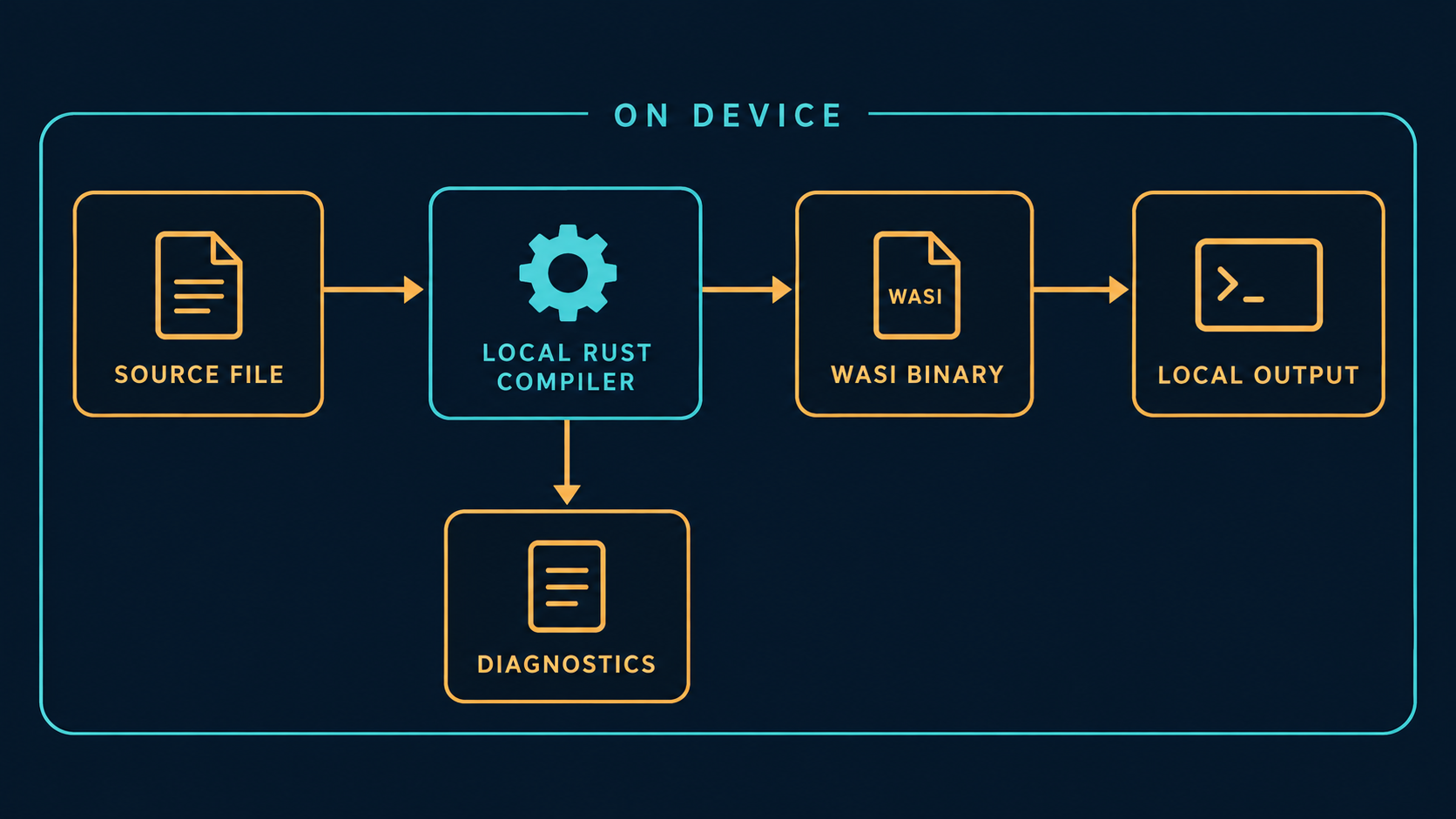
There are four distinct stages in the usual loop. First, an editable source file lives in the project workspace. Second, the local compiler checks it and, for a requested build, produces a WASI binary. Third, Crabrix executes that binary in a fresh runtime store. Fourth, the program writes output or returns a result that the app shows in Output. The compiler can also report diagnostics along the way. A failed check stops before a new program can run; an empty Output panel after a successful build may simply mean the program never printed anything.
Keeping those stages separate helps with debugging. A red diagnostic is about code the compiler could not accept. A panic or nonzero exit after a successful build is about a program that did run. A line from println! belongs to stdout, not to the compiler. When you modify a file, predict which stage your change can affect before tapping Run. If a formatting placeholder is wrong, expect a compile-time message. If a branch prints only for one input, expect the build to succeed and output to vary with the input.
The app keeps compilation and program execution as separate, observable steps.
What “local” does and does not promise
The compiler and runtime execute on the device. Source does not need to be uploaded to a compilation server for Check or Run. The app bundle contains the pinned compiler and sysroot; a phone does not download new compiler executable code to replace them. This is a concrete statement about the build loop, not a claim that every app feature is offline or that network access never occurs. Course downloads, a supported dependency that has not been cached, or importing a project can involve the network. A cached and pinned package archive can be reused for an offline rebuild under the conditions documented in the app.
A project terminal is likewise local but deliberately narrower than a Mac shell. It offers commands over the project workspace; it does not start arbitrary host processes or grant a Rust program unrestricted iOS access. The WASI guest has no network import. These limits protect the boundary between a user-edited project and the host app. They also matter when evaluating a crate: code that expects a native C library, an executable build script, or a socket opened by the guest cannot be assumed to work simply because it compiles on a desktop.
Why WebAssembly and WASI appear in the design
Rust normally compiles native code for a target platform. In Crabrix, the bundled compiler is itself a WebAssembly program run through CrabrixRuntime, a Swift interpreter derived from WasmKit. The project output targets wasm32-wasip1. That target gives a defined set of filesystem and process-style interfaces that the app can provide inside a bounded workspace. The runtime can meter execution, limit memory and output, and start a fresh store for program runs. This architecture is different from handing user source to a server or trying to execute an arbitrary new iOS binary.
The target is a compatibility choice, not a promise that every Rust ecosystem package will work. A pure Rust library that fits the supported target and build flow may be usable. A dependency that needs a host executable build.rs or a procedural macro requires capabilities outside the current local subset. The most honest workflow is to check a dependency before a long build, read the compatibility result, and keep an alternative design in mind. Often a small hand-written parser or a crate without native components is enough for a learning project.
The cost of genuine work
A real compiler performs genuine work, and a phone is not a desktop workstation. The first check of a changed project may spend time parsing, resolving packages, checking types, and generating code. Dependencies add more work. Repeating an identical build can benefit from local artifact caches, while changing source or configuration can invalidate some cached results. A spinner is not proof that the app is doing useful work by itself; a trustworthy interface should show which phase is active and surface errors when work stops.
For your own experiments, compare the right things. Run a tiny one-file program once, then run it again unchanged, then change one line and run again. Notice which run is fastest and which needs compilation. Avoid extrapolating from one warm cache measurement to a new Cargo project with dependencies. Limits on memory, writable files, runtime, and output can stop an overlarge guest. Treat those boundaries as part of the supported environment, just as a desktop toolchain has a target triple and system libraries that define its behavior.
Dependencies: useful, but selective
Cargo makes Rust projects larger than a single source file, and Crabrix supports a focused subset of that workflow. The app can resolve supported crates.io packages, verify downloaded archives against registry checksums, write a lockfile, and build suitable dependencies for its target. Once the exact verified source archives are cached or pinned for offline use, the same packages can be available without another download. That is a useful bridge from a tutorial snippet to a multi-file project with a manifest.
The subset has edges. Procedural-macro crates, executable build scripts, and native C linking are outside the supported local Cargo path. A package may depend on one of these indirectly, so read the whole dependency result rather than just the top-level crate name. A lockfile records a selected dependency graph, but it is not a magic guarantee that every dependency can be compiled for every target. Start with a small pure-Rust dependency, verify it works, then add one package at a time. That makes an incompatibility diagnosable instead of leaving you with a large unresolved graph.
A bounded workspace is a useful workspace
An editable project deserves to survive beyond the lesson that created it. Crabrix keeps project files in a local workspace, with a file tree, source editor, diagnostics, Output, and a project terminal. The terminal can help inspect files or run supported project commands, but it is not an unrestricted shell. That distinction is visible in the product because an honest tool should not imply that it can do what the platform and sandbox do not permit.
The runtime also protects itself from guest behavior. A program can loop forever, produce huge output, or request too much memory. Metering, deadlines, and output bounds give the app ways to stop or contain those cases. Stopping a guest is not the same as proving its algorithm correct; it is a resource policy that keeps the device responsive. When a build or run is interrupted, look at which phase stopped and whether a new binary was produced. Do not interpret an old Output line as the result of the latest failed build.
The project workspace is editable while the guest runtime stays inside explicit limits.
Read a diagnostic as evidence
Rust diagnostics often contain a primary message, a source span, notes, and sometimes a suggested change. Begin with the first meaningful error, not the last line in the panel. A missing brace can create many follow-up messages, so repair one cause and check again. If the compiler says “expected X, found Y,” identify which expression produced Y and which function or branch demanded X. This turns the error from a verdict into a map of the program you actually wrote.
For ownership errors, draw the flow of one value: creation, move, borrow, last use. A suggestion to clone may make code compile but can hide an unnecessary allocation or an unclear API. Ask whether a function needs ownership or only a read-only borrow. For a formatting error, count placeholders and supplied values. For a missing trait, inspect the operation that requires it. Each fix should be a conscious statement about the program, not a sequence of edits that happen to quiet the compiler.
A ten-minute experiment
Create a small project and write a function that returns a greeting. First compile and run the program unchanged, and record the exact output. Next misspell a binding name and press Check. Find the highlighted span, predict the smallest correction, then fix it. After that, add a second placeholder to println! but no second argument. Notice that this problem is caught before a new run. Finally restore a valid format and change the text the program prints. You have now observed source editing, compiler validation, a diagnostic, and runtime output as separate events.
Repeat the same method with a borrowed String: let a helper accept &str, call it with a String, and use the String afterward. Then change the helper to take ownership and compare the compiler response. This is more instructive than memorizing a slogan about borrowing. Keep a short note of each prediction, the actual evidence, and the rule you inferred. A local compiler is most valuable when it becomes a tool for testing your understanding, not just a button you press until the red text disappears.
Where to continue
The free Learn section on this website provides the same course topics and examples to read without an account. Start with Rust Basics if you are new to the language, then move through ownership and project structure before tackling concurrency or unsafe code. On the device, open an example in Code and make a durable project copy so you can experiment beyond the lesson. When a project grows, check the target and dependency limits before assuming desktop Cargo behavior.
Crabrix is a focused local Rust workspace. Its strength is that the edit, check, run, and inspect cycle can happen where you are, with a compiler whose identity and limits are visible. Its limits are part of that story. The fastest way to learn is to make a precise prediction, change one thing, read the evidence, and repeat.